Struggling With High Bounce Rates? Here’s How Better UX Design Solves It
Discover how UI UX design services help reduce bounce rate, boost engagement, & drive higher website conversions.
June 16, 2026
Written by

Introduction
Capturing attention is hard. Keeping it is even harder. With digital attention spans now averaging just 8.25 seconds, your website has only a brief window to prove its value before visitors leave.
That is why UI UX design services play a critical role in engagement and conversion performance. Under Google Analytics 4, a bounce is no longer simply a one-page visit. It is a session lasting less than 10 seconds with no meaningful interaction, making bounce rate one of the clearest indicators of user experience quality.
Many businesses assume high bounce rates are caused by poor traffic. More often, they are the result of friction within the user journey. The good news is that these issues are often fixable. In fact, research shows that every $1 invested in UX can generate up to $100 in return.
The challenge is knowing where that friction exists. In this guide, we'll break down the most common UX factors that drive visitors away, what a healthy bounce rate actually looks like. Also, we'll talk about the practical changes that can turn more of your existing traffic into engaged users, qualified leads, and customers.
What Does a Good Bounce Rate Actually Look Like?
Before fixing the problem, it helps to understand what "good" looks like.
Under Google Analytics 4, bounce rate is no longer simply a user viewing one page and leaving. A bounce now reflects a session that lasts less than 10 seconds and includes no meaningful interaction.
The cross-industry median bounce rate currently sits around 47.4%.
| Industry | Average Bounce Rate |
| E-commerce | 45.6% |
| B2B SaaS (Desktop) | 42.8% |
| B2B SaaS (Mobile) | 55.7% |
| Cross-Industry Median | 47.4% |
If your website consistently exceeds 50%, there is a strong possibility that user experience issues are preventing visitors from progressing further into the journey.
In fact, after working on UX audits, redesigns, and optimization projects across a wide range of industries, we at Millipixels have noticed one recurring pattern: teams often assume low engagement is a traffic problem when it is actually an experience problem.
More often than not, the root cause lies in unclear messaging, confusing navigation, mobile usability gaps, or friction within key user journeys. When those barriers are addressed, engagement metrics frequently improve without any increase in traffic.
Why Bounce Rate Is a UX Metric, Not a Marketing Metric
Many organizations assume bounce rates are caused by poor advertising campaigns or low-quality traffic. In reality, traffic only exposes existing experience problems.
Imagine two companies receiving identical traffic from the same campaign. One converts visitors into leads while the other loses them within seconds. The difference is often not the campaign. It is the experience users encounter after they arrive.
The strongest predictor of engagement is not traffic volume. It is how effectively your website communicates value, builds trust, and guides users toward action.
| UX Factor | Impact on Bounce Rate |
| Page Speed | Very High |
| Mobile Experience | Very High |
| Visual Hierarchy | High |
| Navigation Clarity | High |
| Trust Signals | High |
| Content Relevance | High |
| UI Consistency | Medium to High |
This is why businesses increasingly invest in UX audit services, UX redesign services, and UI UX consulting services before increasing marketing spend.
Struggling with High Bounce Rates and low conversions ?
Consult MillipixelsThe 5 UX Flaws Causing Your High Bounce Rate (And the Modern Fixes)
1. Visual Friction and Intrusive Micro-Elements
Most people think popups are the problem. The real issue is cognitive overload.
Users arrive with a goal, but many websites immediately compete for their attention with cookie banners, newsletter popups, chat widgets, and promotional overlays. Research shows that these intrusive elements appear on nearly 59% of websites, while users form an impression of a site in just 0.05 seconds.
When everything demands attention, users often choose to do nothing at all.
The solution is simple: prioritize clarity. Use a single primary CTA, strategic whitespace, and intent-based prompts instead of immediate interruptions. Effective website UX design services guide users toward action rather than overwhelming them with options, helping businesses identify and eliminate design decisions that create unnecessary friction and reduce conversions .
2. Interaction Delay and the 3-Second Rule
Speed directly impacts engagement. Pages that load in under one second experience bounce rates of around 30.8%, while pages taking three to six seconds see bounce rates rise to 49.3%.
The problem is not just loading speed. It is perceived responsiveness. Every delay makes users question whether the site is working, increasing the likelihood they'll leave.
Modern UI UX design and development services improve performance through optimized images, lazy loading, Core Web Vitals improvements, and faster interaction response times. A website that feels fast keeps users engaged. One that feels slow loses them before the journey begins.
3. The Mobile Usability Gap
Despite years of mobile-first design, mobile bounce rates remain significantly higher than desktop rates across most industries. The reason is simple: responsive design is not the same as mobile usability.
Baymard Institute's two-year Mobile UX study found that 63% of mobile users abandoned a product or site at least once during testing solely because of preventable mobile usability issues. These issues included problems related to navigation, forms, touch interactions, and other mobile UX friction points.
Mobile users are often navigating one-handed and multitasking in distracting environments. This is why mobile UI UX design services focus on thumb-friendly navigation, simplified user journeys, and faster task completion. For businesses building digital products, mobile app UI UX design services help reduce friction and improve engagement across every touchpoint.
The goal is not just to make a website fit a smaller screen. It is to make it easier to use.
4. Information Architecture and Structural Confusion
Users do not read websites. They scan them.
Research from Nielsen Norman Group shows that visitors typically scan pages in predictable patterns, searching for quick answers to key questions:
- What do you do?
- How can you help me?
- Why should I trust you?
- What should I do next?
When those answers are buried beneath cluttered layouts, confusing navigation, or weak visual hierarchy, users leave. Conversely, a well-structured experience can increase task completion rates by up to 40%.
A simple way to evaluate your website is the Five-Second Clarity Test. If visitors cannot quickly understand what your business does, who it serves, and what action to take next, structural confusion may be contributing to bounce rates.
Strong enterprise UX design services and UX redesign services prioritize clarity through clear value propositions, logical navigation, visual hierarchy, and prominent CTAs. Users should never have to work to understand your business. Businesses looking to improve performance often seek partners with proven experience in creating user experiences that support both engagement and conversion goals.
5. Missing Trust and Credibility Signals
Even if visitors understand your offering, they may still leave if they do not trust it.
Trust is built through visible credibility signals such as case studies, client testimonials, reviews, industry recognition, security indicators, and clear company information. Without them, users are often reluctant to take the next step.
This is especially important for B2B organizations, where decision-makers evaluate risk before making purchasing decisions. As a result, UI/UX design services for B2B companies often prioritize trust-building elements throughout the customer journey to increase confidence, engagement, and conversions.
The easier it is for users to trust your business, the easier it becomes for them to act. This is particularly true in industries where user confidence directly influences engagement, adherence, and long-term outcomes.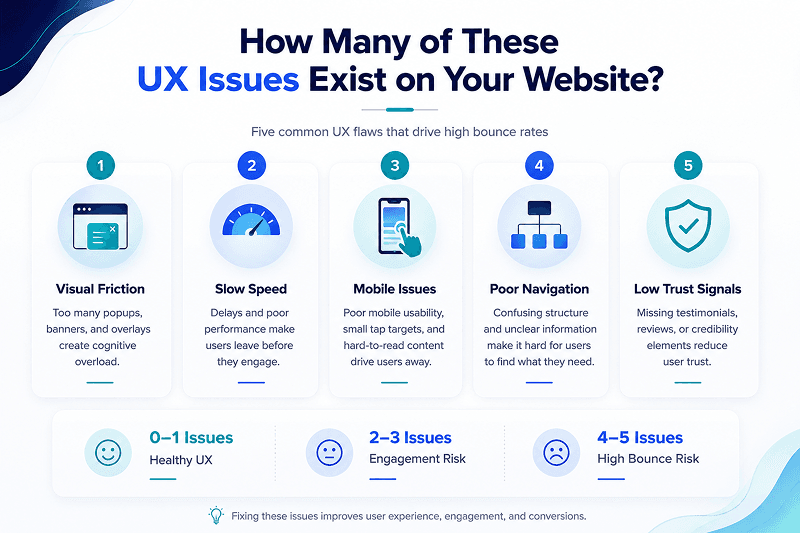
A Real-World Example of UX Reducing Bounce and Improving Conversions
At Millipixels, one pattern we consistently see is that businesses focus heavily on acquisition and marketing efforts. The often overlook how users experience their product once they arrive.
A good example is Millipixels' work with Distil, a customer intelligence platform focused on helping marketers leverage AI and data science to build more personalized customer relationships.
The challenge was to transform complex data insights into an intuitive, self-service experience that marketers could navigate confidently without technical expertise. Through a user-centered UX strategy, streamlined workflows, and a redesigned interface focused on self-discovery and ease of use, the platform made sophisticated customer intelligence more accessible and actionable.
The result was a 46% increase in customer engagement within months of launch, alongside stronger user adoption and improved marketing effectiveness across e-commerce clients.
This reinforces a simple reality: improving engagement and conversion rates is rarely about adding more features. It is about creating a clearer, more intuitive experience that helps users discover value faster and take action with confidence.
See How a UX-Led Redesign Increased Customer Engagement by 46%
Download the Case StudyHow to Audit Your Own UX Today
The good news is that identifying UX problems does not require a massive research budget or months of research. In many cases, a structured review can quickly reveal the friction points causing visitors to leave. The key is to move beyond assumptions and focus on how real users interact with your website.
Step 1: Identify Where the Bounce Is Happening
One of the biggest mistakes businesses make is looking at a single, blended bounce rate. Averages rarely tell the full story.
Instead, segment your data to identify patterns across different user groups and traffic sources. Start by comparing:
- Mobile versus desktop visitors
- Organic versus paid traffic
- New versus returning users
- Individual landing pages
For example, if mobile visitors are bouncing significantly more than desktop users, the issue may be related to usability rather than traffic quality. Most companies analyze averages. Effective UX teams analyze patterns.
Step 2: Observe Real User Behavior
Once you've identified where users are dropping off, the next step is understanding why.
You do not need hundreds of participants to uncover usability issues. Research from Nielsen Norman Group suggests that testing with just five users can uncover approximately 85% of usability problems.
Use tools such as:
- Session recordings
- Heatmaps
- Scroll maps
- User interviews
- Usability testing sessions
Real user behavior often reveals friction that analytics alone cannot. What users say they do and what they actually do are often very different.
Step 3: Audit the First 10 Seconds
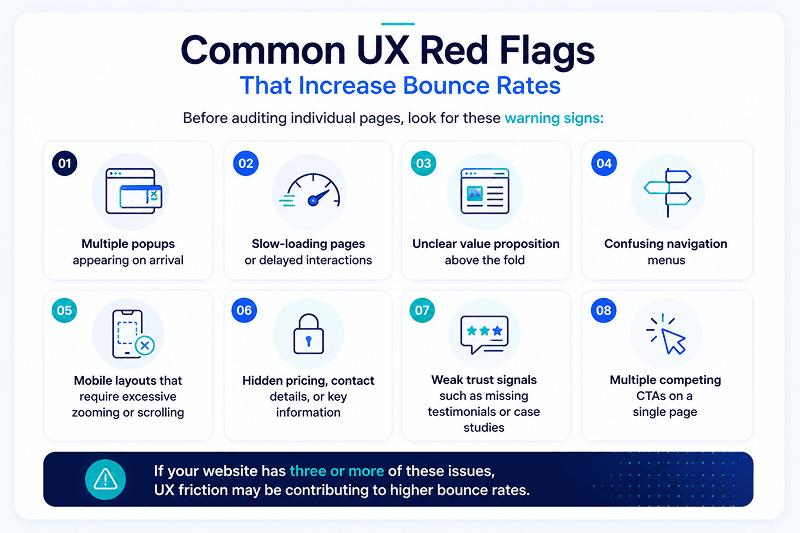
Most bounce decisions happen before users even begin scrolling. When a visitor lands on your website, ask yourself, can they immediately understand:
- What your business does?
- Who your product or service is for?
- What action they should take next?
- Why should they trust you?
Your value proposition, primary CTA, trust signals, and navigation should all be visible and easy to understand within the first few seconds. If visitors have to search for basic information, they are far more likely to leave.
Step 4: Evaluate the First Three Clicks
A good user experience reduces the effort required to find important information.
Review your most important user journeys and determine whether visitors can access key pages within three clicks or fewer.
This includes:
- Product or service information
- Pricing details
- Contact forms
- Demo requests
- Case studies
If users must navigate through multiple menus or pages before finding what they need, friction is likely contributing to higher bounce rates and lower conversions.
Experience Audit Checklist
Before concluding your audit, use this quick checklist to assess the overall health of your user experience:
| Question | Yes / No |
| Can visitors understand your value proposition within five seconds? | |
| Is the primary CTA visible above the fold? | |
| Does the website load quickly on mobile devices? | |
| Can users complete key tasks within three clicks? | |
| Are trust indicators clearly visible? | |
| Is navigation intuitive and easy to understand? | |
| Are there any obvious usability issues? | |
| Is the experience consistent across devices? | |
| Are UX performance metrics being tracked? | |
| Is the interface designed around user goals rather than internal priorities? |
The more "No" answers you identify, the greater the opportunity to improve engagement, reduce bounce rates, and create a more effective user experience.
Conclusion: Lower Bounce Rates, Higher Conversions
A high bounce rate is a feedback. It highlights where your website is creating friction through slow performance, poor usability, confusing navigation, or unclear messaging. Businesses that invest in UI UX design services create better user experiences, stronger engagement, improved customer retention, and higher conversion rates.
The companies that succeed online are not always the ones driving the most traffic. They are the ones making it easiest for users to take action. Fix the experience, and the metrics will follow.
At Millipixels, we help businesses identify UX issues, improve user journeys, and increase conversions through strategic UX audits, UI/UX consulting, and design services.
Book a consultation with Millipixels to understand what's driving users away and discover opportunities to improve engagement and growth.
Frequently Asked Questions
1.What are UI UX Design Services?
UI UX design services involve researching, designing, testing, and optimizing digital experiences to make products easier to use and more effective at achieving business goals. These services typically include user research, wireframing, prototyping, interface design, usability testing, and ongoing optimization.
A professional UI UX design services company focuses on both the visual layer (UI) and the overall user journey (UX). Whether it's website UX design services, mobile UI UX design services, or custom UI UX solutions, the goal is to create intuitive experiences that improve engagement, conversions, and customer satisfaction.
2.Why is UI UX Important for Business Growth?
Good UX directly impacts revenue. When users can easily find information, complete tasks, and navigate your platform, they are more likely to convert, return, and recommend your business to others.
Investing in UI UX consulting services, enterprise UX design services, and human-centered design helps businesses reduce friction, improve customer retention through UX, strengthen brand perception, and support long-term digital experience optimization.
3.How Does UX Design Improve Conversion Rates and Reduce Bounce Rates?
High bounce rates are often symptoms of underlying UX pain points, not traffic problems. Visitors leave when they encounter slow-loading pages, confusing navigation, poor mobile experiences, weak information hierarchy, or unclear calls to action. UX design addresses these issues by making it easier for users to understand your offering and take the next step.
Professional UI UX design and development services improve key UX performance metrics such as engagement rate, task completion, and user satisfaction. Through better responsive UI design, stronger UI consistency, optimized user flows, and conversion optimization UI UX services, businesses can increase conversions while significantly reducing bounce rates. The result is a smoother experience that keeps visitors engaged and moving toward meaningful actions.
4.How Much Do UI UX Design Services Cost?
The UI UX redesign cost depends on project scope, complexity, research requirements, and the type of product being designed. Small website improvements may cost significantly less than a full-scale enterprise platform redesign.
Businesses working with a top UX design company, enterprise UX consulting firm, or UI UX redesign agency should view UX as an investment rather than a design expense. A comprehensive project involving research, usability testing, strategy, and implementation often delivers measurable returns through improved conversions, engagement, and customer retention.
5.How Long Does a UI UX Redesign Take?
The timeline for UX redesign services varies depending on project size. A simple website redesign may take a few weeks, while larger enterprise platforms can take several months.
Factors such as user research, stakeholder alignment, testing requirements, and development complexity all influence project duration.
6.Why is My Website Getting Traffic but No Conversions?
Traffic without conversions often indicates experience-related issues rather than acquisition problems. Common causes include unclear messaging, weak value propositions, poor navigation, lack of trust signals, and unresolved product usability issues.
An in-depth review through UX audit services can help identify friction points that prevent users from moving further in the conversion journey.
7.How Do I Reduce Bounce Rate with UX Design?
Reducing bounce rates starts with eliminating friction. Focus on faster page speeds, clearer navigation, mobile optimization, stronger content hierarchy, and visible trust signals.
Businesses often use website UX design services to create smoother user journeys that encourage deeper engagement.
8.How Do I Improve Website Usability?
Website usability improves when users can complete tasks quickly and confidently. Prioritize intuitive navigation, accessible layouts, fast load times, and clear calls to action.
A combination of UX audit services, UI UX consulting services, and custom UI UX solutions can help uncover usability gaps and create a more effective digital experience.
9.What Are the Key Benefits of Professional UI/UX Design Services?
Professional UI/UX design services for B2B companies, startups, and enterprises help improve usability, engagement, conversions, and retention. They also reduce friction across the customer journey while strengthening brand credibility.
Whether you're looking for a UI UX agency for B2B SaaS, a UI UX design company for startups, the best UI UX design agency, or affordable UI UX design services, the key benefits include better user experiences, stronger business outcomes, improved click-through improvement, and sustainable growth through data-driven design decisions.
Written by

Parthsarathy Sharma
With 4+ years of experience across AI, UX, GCC/outsourcing, enterprise technology, and brand strategy, Parthsarathy brings a research-driven lens to digital experience content. His work focuses on turning emerging technology, customer experience, and business trends into clear, practical perspectives for readers.